To start a rec basketball team on Papalocal, open Sports and tap Start. Type the name on the jerseys and pick Basketball, then tap Start the team. It's free. Your team gets its own join code. Share with families sends the code with a link they can tap to join. Then open the team and add the season.
Step by step
Before you start: you need the Papalocal app and a free account. Open Sports from Apps, or add it from the App Store.
0:00Start a team. In Sports, tap Start. Type the name on the jerseys in Team name.
0:05Pick the sport. Tap the sport your team plays, here Basketball. Leave Run by on Me, then tap Start the team. It's free.
0:10Get your join code. Your team is live, with its own join code: eight letters and numbers.
0:13Share it with families. Tap Share with families. The words carry the code and a link families tap to join. They go out from your own phone.
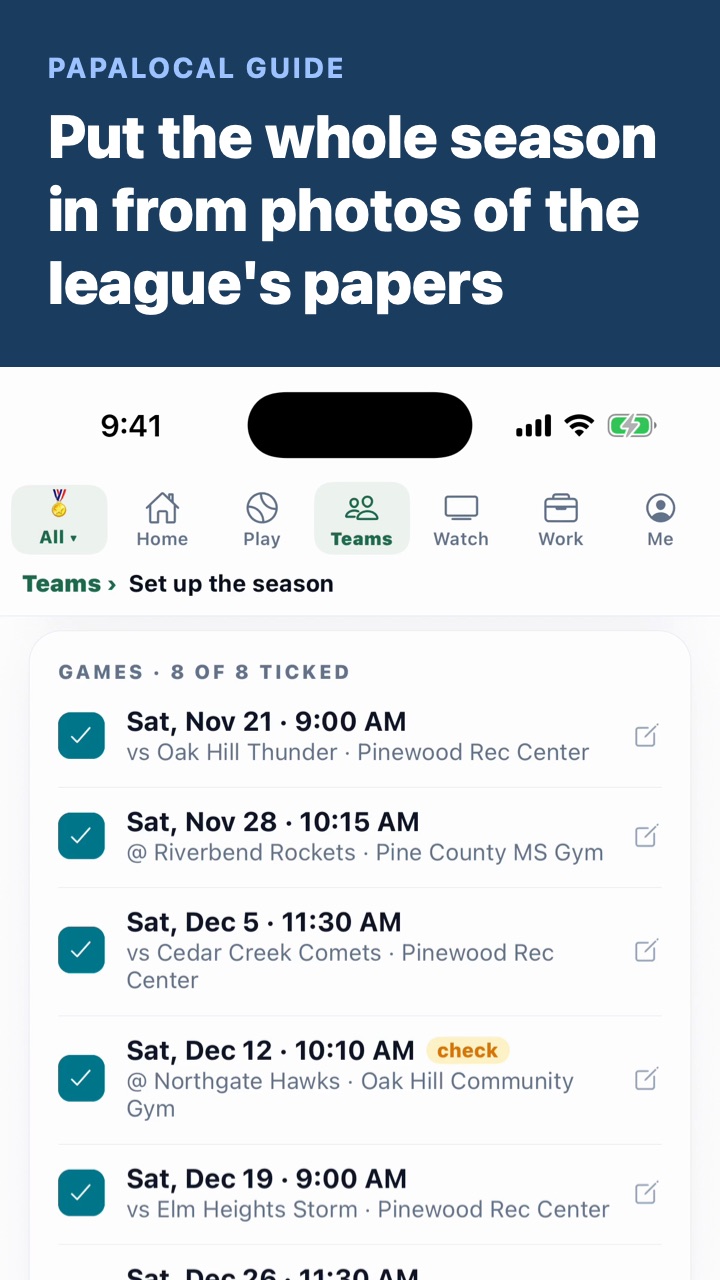
0:18Open the team. Tap Open the team. The schedule starts empty. Snap the schedule reads the league's papers, and you check the season before it's saved.
Good to know
Run by Me is a team you run yourself. Under the button, the screen says it's free.
The message names what's on Papalocal: schedule, RSVPs, scores and the team chat. It ends with the tap-to-join link, and the code for anyone typing it in.
Treat the code like a key. Anyone who has it can join the team in the app, without your yes. Send it only to your team's families.
A club's team is different. A club picks New club under Run by, and a club's teams are on its paid plan. Start your sports club shows that.
Not covered here. Signing up with your rec league, background checks or picking players. Ask your league what it needs from a coach.
The Pinewood Hornets 10U, Pine County Rec Basketball and everyone in the video are made up.
Written with AI from this video's script and screens.
Your team is one part of Papalocal.
The everything app. As simple as you want it, or as complete as you allow it to be.
Looking for a youth sports team management app? Starting the team is free. Its schedule, families, rules and chat sit in the same account.
One free account for your town and the people in it:
News, events and deals, local where your town has them
Messages and video with people you know
Music, books and shows
Your money and your people
An AI that helps with everyday things, with free credits to try it
Start with a few apps, and add more from the App Store whenever you're ready. Free to join, no card. Bank and card sync and some other extras come with a paid plan. One account works on the app and the website.
No. A team you run yourself is free to start. Reading the league's papers from photos, and asking the rules a question, use AI credits. A new account starts with 100 free. More are 1¢ each on papalocal.com.
I'm a parent, not the coach. Can I start it?
Yes. Any parent can start the team. When the coach joins as a coach and you say yes, you run it together. It's the same team, so the roster, history and chat stay.
Can I start a team for another sport?
Yes. You tap the sport your team plays. The list includes baseball, softball, soccer, football, volleyball, tennis and pickleball, and Other.
Where do I find the join code later?
On the team's Team tab. You can share it from there any time.
Comments
Log in to comment. New here?